
PHJOIN Deposit Guide 2026: How to Deposit via GCash and USDT – PHJOIN
Introduction to PHJOIN Deposit Methods
Making a deposit an important step for users who want to access the services available on PHJOIN. Understanding the available payment methods, preparing the correct transaction details, and following the appropriate procedures can help users manage deposits more efficiently.
This PHJOIN Deposit Guide 2026 explains how to approach deposits using two payment methods commonly used in digital transactions: GCash and USDT. It covers account preparation, step-by-step instructions, transaction verification, common deposit issues, and essential security practices.
Before making a payment, users should confirm that PHJOIN officially supports their selected payment method. Available options, minimum deposit amounts, processing times, network requirements, and transaction fees may vary depending on the platform’s current policies and payment provider.
Overview of PHJOIN Deposit Methods
PHJOIN users considering GCash or USDT should understand how these methods differ before selecting a payment option.
| Comparison Criteria | GCash | USDT |
|---|---|---|
| Payment type | Mobile e-wallet | Cryptocurrency |
| Currency or asset | Philippine pesos (PHP) | Tether (USDT) |
| Main requirement | An eligible and verified GCash account | A compatible cryptocurrency wallet or exchange account |
| Transaction process | E-wallet payment or authorized transfer | Blockchain transfer to the specified address |
| Processing time | Depends on the payment provider and platform verification | Depends on blockchain confirmation and platform verification |
| Potential fees | Provider or transaction fees may apply | Network and service fees may apply |
| Important verification | Recipient details and PHP amount | Wallet address, supported network, and USDT amount |
| Main precaution | Never disclose your MPIN or OTP | Never send funds to an unverified address or unsupported network |
Note: This table provides a general comparison. It does not confirm that either method is currently available on PHJOIN or establish specific platform processing times or fees.
How to Prepare Before Making a PHJOIN Deposit
Preparing your account and payment details before starting a transaction can help reduce mistakes and unnecessary delays.
1. Access Your PHJOIN Account
Open the official PHJOIN website using a verified address. Sign in with your register account details and check that your account information is correct.
If you do not have an account, review the platform’s registration requirements first. Do not enter login credentials on unfamiliar websites, advertisements, or unofficial pages claiming to represent PHJOIN.
2. Check the Available Payment Options
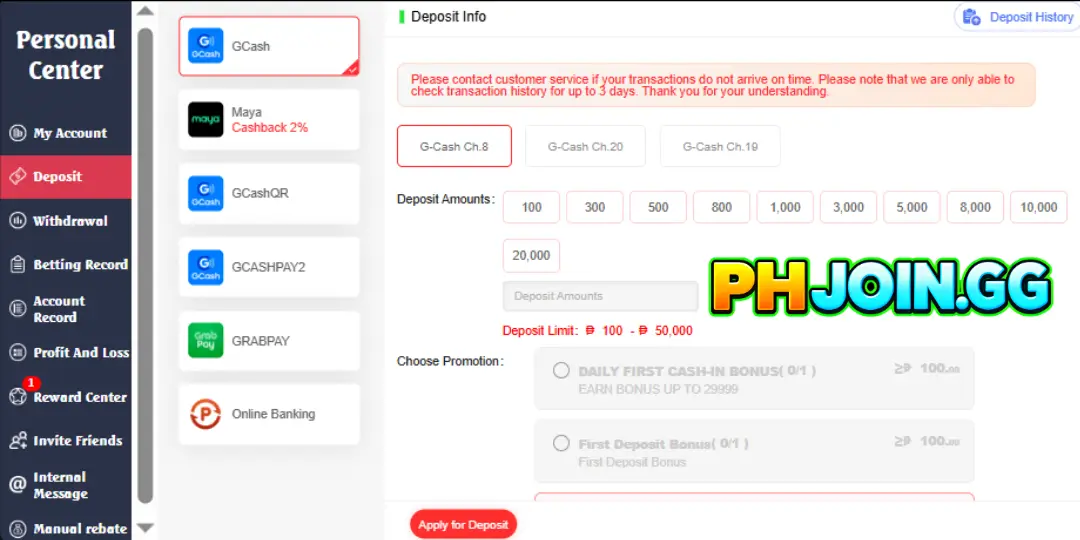
Navigate to the deposit, cashier, or payment section of your account, if available. Review the payment methods displayed on the actual platform.
If GCash or USDT is not listed, do not assume that the method is supported. Contact the platform’s official support channel to confirm the available options before transferring money.
3. Review Deposit Requirements
Before proceeding, check the minimum and maximum deposit limits, any applicable transaction charges, account verification requirements, and payment instructions.
For cryptocurrency transactions, also verify the supported USDT network. For GCash transactions, confirm the authorized recipient information and the amount you intend to pay.
How to Deposit on PHJOIN via GCash
GCash is a mobile e-wallet used for digital payments in the Philippines. If GCash is officially available in your PHJOIN cashier, the following general procedure can help you complete the transaction carefully.
Step 1: Open the Deposit Section
Log in to your account and navigate to the deposit or cashier section. Select GCash only if it appears among the officially supported payment methods.
Review the instructions provided on the payment page before continuing.
Step 2: Enter Your Deposit Amount
Enter the amount you intend to deposit in Philippine pesos (PHP), making sure it falls within the displayed limits.
Double-check the amount before proceeding. If the platform displays a transaction fee or a required payment amount, review the details carefully so that the amount sent matches the instructions.
Step 3: Follow the Authorized GCash Payment Instructions
Depending on the payment provider’s process, you may be directed to an authorized payment page or provided with recipient details.
Verify the recipient’s name, account information, payment reference, and total amount before confirming the transfer. If a payment page redirects you to an unfamiliar website or requests unnecessary sensitive information, stop and verify the request through an official support channel.
Step 4: Confirm the Payment in GCash
Open the official GCash application and review the payment details. Confirm the transaction only when the recipient and amount match the verified instructions.
Never share your GCash MPIN, one-time password (OTP), or account recovery credentials with another person, including anyone claiming to be a support agent.
Step 5: Keep Your Transaction Receipt
After completing the payment, save the transaction reference number and receipt. Return to your PHJOIN account and check whether the deposit status has been updated.
If the payment is completed in GCash but the corresponding balance has not appeared, avoid immediately submitting another payment. Check the transaction status and contact the appropriate official support channel with your reference number.
How to Deposit on PHJOIN via USDT
USDT, or Tether, is a digital asset designed to maintain a value close to the US dollar. Cryptocurrency transfers require particular care because transactions sent to an incorrect address or through an unsupported network may be difficult or impossible to recover.
Use the following steps only if PHJOIN explicitly supports USDT deposits and the transaction is lawful in your jurisdiction.
Step 1: Select USDT as Your Payment Method
Open the verified deposit section and select USDT if it is listed as an available option.
Check the displayed deposit instructions, including the minimum amount, supported network, and any required payment reference or account identifier.
Step 2: Verify the Supported Blockchain Network
USDT exists on multiple blockchain networks. A receiving address intended for one network must not automatically be assumed to support another.
Before sending funds, confirm that the sending wallet or exchange and the receiving instructions specify the same supported network. Do not choose a network based only on a lower transaction fee.
Step 3: Verify the Receiving Wallet Address
Copy the receiving address directly from the verified payment instructions, if provided. Check the address carefully before initiating the transfer.
If the platform requires a memo, tag, or other reference, follow the exact instructions. Do not send cryptocurrency to an address supplied through an unsolicited message or an unverified social media account.
Step 4: Enter and Review the USDT Amount
Enter the intended amount of USDT and review the transaction summary.
Confirm the following information before proceeding:
- The receiving wallet address is correct.
- The blockchain network matches the receiving instructions.
- The amount meets the stated deposit requirements.
- The network fee and any additional charges are understood.
- Any required memo or reference information is included.
A small test transfer may be worth considering for a new address when practical, but it can incur additional fees and does not guarantee that the receiving platform will credit the transaction.
Step 5: Confirm the Transfer and Save the Transaction Hash
After confirming all details, authorize the transfer through your wallet or exchange.
Save the transaction hash (TXID), which can be used to check the transaction’s status on the relevant blockchain explorer. A successful blockchain transfer does not necessarily mean that the receiving platform has credited the deposit; additional confirmations or account checks may be required.
Step 6: Check the Deposit Status
Return to your account and check the transaction status if the platform provides a deposit history page.
If the transfer has been confirmed on the blockchain but the deposit is not reflected in your account, contact official support and provide the TXID, transfer amount, network, and transaction time. Never disclose your wallet’s private key or recovery phrase.
GCash vs. USDT: Which Payment Method Should You Choose?
The appropriate method depends on your payment experience, transaction requirements, and ability to verify the relevant details.
GCash may be more convenient for users who already use the e-wallet and prefer transactions denominated in Philippine pesos. The main priorities are confirming the recipient, checking the amount, and protecting account authentication details.
USDT may suit experienced cryptocurrency users who understand blockchain networks, wallet addresses, transaction fees, and confirmation requirements. However, cryptocurrency transfers introduce additional risks, including incorrect network selection, irreversible transfers, price-related differences, and wallet security concerns.
Neither method guarantees instant processing or a successful deposit. Always review the actual payment instructions and applicable terms before making a decision.
Common PHJOIN Deposit Problems and How to Address Them
GCash Payment Completed but the Deposit Is Missing
Check the GCash transaction history and verify whether the payment was successful, pending, or reversed. Keep the receipt and reference number, then contact the official payment provider or platform support as appropriate.
Do not make a second payment simply because the balance has not updated.
USDT Transfer Is Still Pending
Check the transaction hash using a blockchain explorer that supports the selected network. A transfer may require additional network confirmations before the recipient can process it.
If the transaction remains pending, consult your sending wallet or exchange for the current status.
USDT Was Sent Through the Wrong Network
Contact the receiving platform’s official support channel and provide the transaction hash and relevant details. Recovery may not be possible, even when the funds are visible on a blockchain explorer.
Never pay an unknown person an additional recovery fee based on an unsolicited promise to retrieve the funds.
Deposit Amount Does Not Match the Required Amount
Review the original instructions and the payment receipt. Differences may result from incorrect entry, transaction fees, exchange conversion, or an incomplete transfer.
Contact the official payment provider or platform support before sending any additional funds.
Account Verification Is Required
Some services may require identity verification or additional payment checks. Follow the official procedure and provide only the information reasonably required through a verified, secure channel.
Do not send identity documents, passwords, OTPs, or financial information to an unverified contact.
Essential Security Tips for PHJOIN Deposits
Responsible payment practices help reduce avoidable financial and account-security risks.
- Use verified access points: Confirm the official website address before signing in or making a payment.
- Check every transaction detail: Review the amount, recipient, network, and applicable fees before confirming.
- Protect authentication information: Never share passwords, MPINs, OTPs, private keys, or wallet recovery phrases.
- Keep transaction records: Save receipts, reference numbers, and blockchain transaction hashes where applicable.
- Avoid duplicate payments: Investigate a delayed transaction before attempting another deposit.
- Be cautious of impersonation: Treat unsolicited messages promising guaranteed deposits, special payment channels, or fund recovery with suspicion.
- Set a personal spending limit: Only use money you can afford to lose, and do not borrow money to fund gambling or chase previous losses.
- Follow applicable laws: Confirm that the service is legally available to you and comply with local age, payment, and financial regulations.
Frequently Asked Questions About PHJOIN Deposits
1. How can I deposit on PHJOIN using GCash?
If GCash is officially supported, sign in, open the deposit section, select GCash, follow the verified payment instructions, and save your receipt. Confirm that the payment has been completed before assuming the deposit has been credited.
2. Can I deposit on PHJOIN using USDT?
USDT can be used only if it is listed as an officially supported payment method. Verify the receiving address, blockchain network, minimum amount, and any required reference before sending cryptocurrency.
3. How long does a PHJOIN deposit take?
Processing times depend on the payment method, provider, transaction status, and platform verification procedures. Check the actual payment instructions for current estimates rather than relying on a universal processing time.
4. What should I do if my deposit does not appear?
Check your payment receipt or transaction hash, confirm the transaction status, and contact the relevant official support channel. Do not send a duplicate payment until the original transaction has been investigated.
5. Are there fees for GCash or USDT deposits?
Fees may vary by provider, payment channel, blockchain network, and transaction type. Review the applicable fee information before authorizing the payment.
6. Is it safe to deposit on PHJOIN?
Safety depends on whether the platform is legitimate and lawfully available, whether the payment instructions are authentic, and how securely you manage your account and funds. Verify the platform’s licensing and terms independently before depositing. No payment method can eliminate all financial or security risks.
Conclusion: Make Informed PHJOIN Deposit Decisions
Understanding the differences between GCash and USDT can help users approach digital payments with greater care. GCash involves verifying an e-wallet payment and its recipient details, while USDT requires additional attention to blockchain networks, receiving addresses, transaction fees, and confirmation status.
This PHJOIN Deposit Guide 2026 provides a practical framework for checking payment requirements, following transaction instructions, keeping records, and addressing common deposit problems. Because payment options and procedures can change, always rely on verified, current instructions rather than assumed platform features.
Before making any deposit, confirm the service’s legitimacy, applicable legal requirements, and payment conditions. Make informed financial decisions, protect your personal information, and never deposit money you cannot afford to lose.