
PHJOIN Withdrawal Guide – How to Withdraw Funds from PHJOIN Step by Step – PHJOIN

1. Introduction to PHJOIN Withdrawal
Withdrawing funds is an important part of managing an online account. Understanding the withdrawal process, checking your payment details, and monitoring transaction status can help you manage your PHJOIN App account more confidently and reduce avoidable errors.
This PHJOIN Withdrawal Guide provides a step-by-step overview of how to submit a withdrawal request, prepare the necessary information, avoid common transaction problems, and respond when a withdrawal has not been completed. The guide is designed for both beginners and users who already have experience with online payment services.
Important Note: Available withdrawal methods, minimum and maximum limits, transaction fees, and processing times depend on the options and terms published by PHJOIN. Always verify the information on the official website before making a transaction.
2. What Is a PHJOIN Withdrawal?
A PHJOIN withdrawal is the process of requesting a transfer of eligible funds from your platform account to a supported payment method.
Depending on the official payment services available, options may include e-wallets, bank transfers, or other supported payment methods. However, a payment method available for deposit is not automatically available for withdrawals.
Before submitting a request, check your eligible balance, recipient details, and applicable transaction conditions. If your account includes promotional rewards or bonuses, additional terms may affect the amount available for withdrawal.
3. What You Need Before Withdrawing from PHJOIN
Preparing the necessary information in advance can make the withdrawal process easier to manage and help reduce transaction errors.
- An active account: Make sure you can access your PHJOIN account.
- An eligible balance: Check your available withdrawal balance and the applicable transaction limits.
- Verification information: Complete any account verification requirements if requested.
- A supported payment method: Select a method officially available in your account.
- Accurate recipient details: Verify the account holder’s name, account number, or e-wallet information before confirming.
- Transaction conditions: Review applicable fees, withdrawal limits, and bonus terms, if any.
Never share your password, OTP, PIN, or wallet recovery information with anyone.
4. How to Withdraw Money from PHJOIN Step by Step
The following steps explain the general withdrawal process. The actual menu names and sequence may vary depending on the PHJOIN interface.
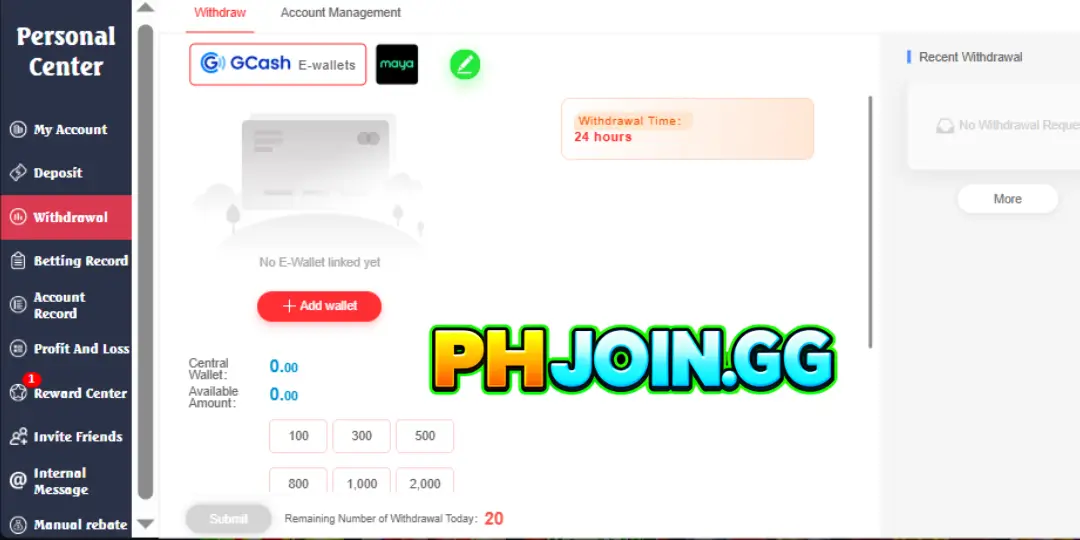
Step 1: Log In to Your PHJOIN Account
Visit the official PHJOIN website that you have independently verified and log in using your account credentials.
Carefully check the domain before entering personal information. Avoid logging in through suspicious links sent by unknown accounts or displayed on unverified websites.
Step 2: Open the Withdrawal Section
After logging in, look for Withdrawal, Withdraw, Cashier, or a similar withdrawal function in your account dashboard.
Read the displayed instructions to identify the available payment methods and any requirements you must meet.
If you cannot find the withdrawal section, check the help area or contact official customer support instead of using an unverified third-party service.
Step 3: Select a Withdrawal Method
Review the payment methods supported by PHJOIN and choose one that suits your needs.
Depending on the services currently available, the platform may offer options such as e-wallets or bank transfers. However, you should confirm availability directly in your account because payment options may change.
Choose a method that you can access and whose transaction history you can easily check.
Step 4: Enter Your Withdrawal Amount
Enter the amount you want to withdraw according to the currency and limits specified by the system.
Before proceeding, check the following:
- Your current balance and eligible withdrawal balance.
- The minimum and maximum withdrawal limits.
- Any published transaction fees.
- Account verification requirements.
- Terms related to bonuses or promotional rewards.
Do not submit a request if the expected amount you will receive or the applicable fees are unclear. Review the conditions before confirming.
Step 5: Verify Your Receiving Account Details
This is an important step in preventing payment errors.
Carefully check the recipient’s name, bank account number, e-wallet information, and any other details required by the system. Make sure the information is accurate and belongs to an account you are legally authorized to use.
If you notice an error, correct it before submitting the request. Never share your login credentials or security codes with anyone claiming to process the transaction on your behalf.
Step 6: Confirm and Submit Your Withdrawal Request
After completing the necessary checks, review all the information and submit your request according to the on-screen instructions.
If a confirmation page or transaction reference number appears, save the details for future reference.
Remember that submitting a withdrawal request does not necessarily mean the funds have already been transferred. The transaction may need to pass through verification and payment-processing procedures before completion.
Step 7: Track Your Withdrawal Status
After submitting your request, visit the transaction history or withdrawal management section to check its status.
Depending on the system, your request may be marked as pending, processing, completed, or rejected.
If the transaction takes longer than the stated processing period, review your transaction history, save the reference number, and contact official customer support for clarification.
Avoid submitting multiple identical withdrawal requests while the original transaction is still being processed.
5. PHJOIN Withdrawal Process: Quick Reference Table
The following table summarizes the essential steps to help you review the process before making a withdrawal.
| Stage | Required Action | Purpose |
|---|---|---|
| 1. Log in | Access the official website and sign in | Ensure you are using the correct account |
| 2. Check your balance | Confirm the amount eligible for withdrawal | Avoid submitting an invalid request |
| 3. Select a method | Review the available payment options | Choose a suitable receiving method |
| 4. Enter the amount | Input an amount within the permitted limits | Reduce amount-related errors |
| 5. Verify details | Check the recipient’s name, account number, or wallet details | Prevent incorrect transfers |
| 6. Submit the request | Confirm the details and submit the transaction | Complete the request submission |
| 7. Track progress | Check the status and save the transaction reference | Make follow-up easier if assistance is needed |
This table is a general guide. Always follow the actual interface and conditions published in your PHJOIN account.
6. PHJOIN Withdrawal Methods and Important Considerations
Withdrawal methods may vary depending on the payment system, your location, and current platform policies. Check the options available in your account before proceeding.
Withdrawing Through an E-Wallet
If PHJOIN supports e-wallet withdrawals, verify your receiving account information, transaction limits, and any related verification requirements.
Make sure the wallet is active and accessible so you can confirm when the funds arrive. Do not use wallet information provided by another person unless you have independently verified the account ownership.
Withdrawing Through a Bank Transfer
If bank transfers are available, prepare the correct bank account details required by the system.
Verify the account holder’s name, account number, and any other necessary information before submitting your request. The time required to receive the funds may depend on the payment processor and the relevant bank.
What to Check for Every Withdrawal Method
Regardless of the method you choose, review the following:
- Whether the payment method is officially supported.
- Published withdrawal limits and transaction fees.
- The estimated processing time.
- Account verification requirements.
- Rules regarding the receiving account.
- How to check transaction status and contact support.
Never assume that every deposit method can also be used for withdrawals.
7. PHJOIN Withdrawal Processing Time and Fees
One common question is how long it takes to receive a PHJOIN withdrawal.
There is no single processing time that applies to every transaction. The actual duration may depend on the payment method, account verification status, platform review procedures, the payment provider’s schedule, and other technical factors.
Transaction fees may also vary depending on the method and current terms.
Before submitting your request, carefully review the information displayed by the system. If your transaction is delayed beyond the stated processing period, contact official customer support for assistance.
Be especially cautious of anyone asking you to transfer additional money to a personal account to unlock or release a withdrawal. Only consider fees that are clearly explained and verified through official terms.
8. Common PHJOIN Withdrawal Problems and How to Resolve Them
Below are some situations users may encounter and the appropriate steps to take.
Withdrawal Request Is Pending
Your transaction may still be undergoing verification or waiting for payment processing.
Solution: Check the transaction status, review account notifications, and allow the published processing period to pass before contacting support.
Withdrawal Request Is Rejected
The request may have been rejected because of incorrect recipient details, incomplete verification, or unmet transaction requirements.
Solution: Read the system notification, review your information, and contact official customer support if the reason is unclear.
Funds Have Not Arrived
A transaction marked as completed by the sending system does not necessarily mean the receiving payment provider has immediately updated the balance.
Solution: Check the transaction details and the receiving account’s history. If a reference number is available, provide it to official support for investigation.
You Cannot Withdraw Your Entire Balance
The displayed balance may differ from the amount eligible for withdrawal because of transaction limits, fees, or applicable conditions.
Solution: Review your available balance, withdrawal limits, and relevant terms before submitting your request.
The System Requests Additional Verification
Some transactions may require identity verification or additional security checks.
Solution: Follow the official instructions and submit information only through a verified, secure channel. Never send personal documents to an unverified support account.
9. Tips for Safe and Efficient PHJOIN Withdrawals
To manage your transactions more effectively, follow these practical guidelines:
- Verify the website: Check the domain carefully before logging in.
- Read the withdrawal terms: Understand the applicable limits, fees, and requirements before submitting a request.
- Check receiving details: Verify all payment information to prevent errors.
- Keep transaction records: Save reference numbers and confirmation notifications for future checks.
- Protect your login information: Never share your password, OTP, PIN, or account recovery details.
- Avoid unverified intermediaries: Do not hand over your account to another person to complete a transaction on your behalf.
- Be cautious of additional payment requests: Verify unusual fees through official channels.
- Manage your budget responsibly: Participate only in activities permitted by local law, and never borrow money to gamble.
10. Frequently Asked Questions About PHJOIN Withdrawal
How Do I Withdraw Money from PHJOIN?
Log in to your verified account, open the withdrawal section, select a supported payment method, enter the amount, verify your receiving details, and submit the request according to the displayed instructions.
How Long Does a PHJOIN Withdrawal Take?
Processing time depends on the payment method, verification requirements, and processing procedures. Check the estimated timeframe provided in your account.
Why Is My PHJOIN Withdrawal Still Pending?
Your transaction may be awaiting verification or payment processing. Review your transaction history and contact official support if the waiting period exceeds the stated estimate.
Can I Withdraw Money Without Verifying My Account?
This depends on the system’s policies and transaction requirements. If verification is requested, complete it through an official and secure channel.
What Should I Do If I Enter the Wrong Withdrawal Details?
Contact official customer support as soon as possible and provide the transaction reference number, if available. Do not assume that a submitted transaction can be reversed.
Does PHJOIN Charge Withdrawal Fees?
Fees may vary depending on the payment method and applicable terms. Review the information displayed before confirming your transaction.
11. Conclusion
Understanding how to withdraw money from PHJOIN helps users follow the transaction process, verify payment information, and reduce avoidable errors. From confirming your eligible balance and selecting a supported payment method to checking your request status, each step should be completed carefully.
Before submitting a withdrawal request, review the latest terms, verify the recipient’s information, and keep a record of the transaction. If a problem occurs, contact official customer support instead of transferring money repeatedly or using an unverified intermediary.
Finally, prioritize account security, comply with local laws, and manage your finances responsibly. If you use PHJOIN for gambling activities, remember that gambling involves financial risks and that you should only spend money you can afford to lose.